
The DistilBERT Ceiling: The Exact Moment You Must Evict Client-Side AI to a Web Worker
CWV vs AI

In my last two posts, we looked at how running machine learning models directly in the browser can completely crash your Core Web Vitals, and why a model’s underlying architecture matters far more than its raw parameter count.
But as pragmatic engineers, we eventually have to stop staring at the theoretical problems and look at the actual thresholds. We need a hard line in the sand. If we are building an interactive feature—like a real-time sentiment analysis input, an AI-augmented text editor, or an on-device search filter—what is the absolute heaviest model we can run synchronously on the main thread before the user experience degrades?
After digging into the cross-device data from my systematic client-side inference benchmark, I found the answer. There is a very specific performance ceiling for main-thread execution.
Meet the DistilBERT threshold, and let’s look at the exact moment your code is forced to pack its bags and evict its AI pipelines to a Web Worker.
Setting the Performance Boundary
To find our ceiling, we have to look at how different device classes handle computation when they are pushed to their limits. In my benchmark harness, I tested models under three distinct environments: an unthrottled high-end baseline, a 4x CPU throttle (simulating a standard mid-range Android device), and a 6x CPU throttle (simulating a budget, entry-level mobile device).
Remember, Google’s strict metric for Interaction to Next Paint (INP) dictates that anything over 200 milliseconds officially exits the “Good” category and begins harming your site’s real-world user experience signals.
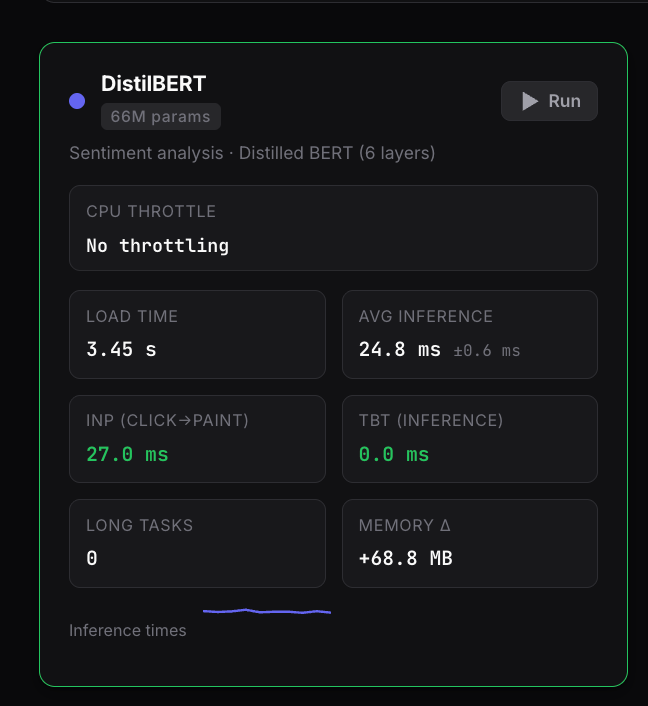
When we chart the INP-equivalent latency of an optimized, encoder-only model like DistilBERT (66M parameters) against its heavier sibling, BERT-base (110M parameters), the ceiling becomes immediately obvious:
The Main-Thread Breakdown Under Stress
On High-End Desktop Hardware (M1 Max): DistilBERT breezes through the benchmark at a crisp 27.2 ms. Even when subjected to a simulated 6x low-end throttle on desktop hardware, it tops out at 145.7 ms. It is the only model tested that successfully maintains a “Good” classification across every single desktop profile.
On Real Mobile Hardware (Samsung Galaxy Z Tri Fold): The moment the code hits real mobile silicon, the stakes double. Unthrottled, DistilBERT runs at 57.1 ms (safely “Good”). BERT-base, however, immediately climbs to 164.3 ms. It technically squeaks by under the 200 ms wire, but it leaves you a terrifyingly thin margin of error for the rest of your application’s UI thread logic.
The Simulated Mobile Crash: The real breaking point happens under mobile CPU throttling. Under a 4x mid-range mobile simulation, DistilBERT slips to 319.7 ms. It completely loses its “Good” status and crosses into “Needs Improvement”. Under the exact same mid-range stress, BERT-base explodes to 720.0 ms—landing deep into the “Poor” category.
Finding the Ceiling
This data provides us with a clear engineering boundary line.
An optimized, encoder-only text model in the DistilBERT class represents the absolute theoretical ceiling for safe, synchronous main-thread inference. It is the absolute max weight you can throw at a modern browser engine without causing instant, noticeable UI stuttering on standard desktop targets.
But notice the massive catch: the moment your target audience shifts to mobile, even the lightest viable model breaches the ceiling under real-world CPU constraints. If a basic 66M parameter sentiment analysis pass forces a mid-range phone to hang for over 300 ms just to paint a frame, you cannot ship it synchronously on the main thread.
The Solution: Offloading to a Web Worker
If your model architecture crosses the DistilBERT parameter ceiling, or if your application targets the global distribution of mobile hardware, you have to change your execution strategy. You cannot treat machine learning inference like a standard, synchronous JavaScript function.
You must evict the workload entirely by moving Transformers.js or ONNX Runtime Web into a dedicated Web Worker.
By isolating the model’s initialization, weight fetching, and matrix math execution inside a background worker thread, you fundamentally change how performance degrades:
Without a Web Worker: The user triggers an AI feature, the main thread locks up completely, animations freeze, input text stops rendering, and the page is entirely unresponsive until inference completes.
With a Web Worker: The user triggers the AI feature, the background thread spikes to 100% CPU usage to run the heavy math, but the main thread remains entirely free. The browser can seamlessly render a loading spinner, respond to user scrolling, and keep input text rendering smoothly at 60 frames per second.
The tradeoff is purely architectural. Running your AI inside a Web Worker means you have to manage asynchronous postMessage data serialization and explicitly design a non-blocking UI state machine.
But given the harsh reality of global device hardware, that minor development overhead is the literal entry fee for keeping your site responsive, accessible, and visible in search indexing. If you pass the ceiling, you have to pay the fee.
In my next post, we are going to look behind the scenes of the benchmark harness itself to unpack a bizarre API anomaly: why Chrome’s native Long Tasks API reported a perfect 0 ms of Total Blocking Time, even while the UI was visibly frozen for half a second.
The full open-source benchmark harness used for this study is available on GitHub at srikarphanikumar/cwv-ai-benchmark. You can run the live suite on your own hardware at benchmark.mspk.me. Full academic paper published on Zenodo.